

Closing the doors
Hide the WordPress version number
Hiding the version is worth doing and it is not a fix. It takes your site out of the cheap sweep that builds a target list by reading the generator tag, and it changes nothing about whether an exploit works. The version also stays recoverable in two anonymous requests, which is measured further down. Read that part before you decide how much of this is worth your afternoon.
What hiding the version buys you
Mass exploitation runs in two stages. A crawler collects sites and sorts
them, then a second pass fires payloads at whatever matched. The first
stage is cheap and dumb. It reads your home page, finds
<meta name="generator" content="WordPress 7.0.4" />,
writes the version into a list, and moves on. If the list it is building
is "everything on 6.4 or lower", removing that tag takes you off it.
That is the whole benefit, and it is real. Fewer probes reach your site, your logs get quieter, and a bot looking for one specific old version never queues you.
Now the part most guides leave out. The second stage does not read the generator tag. An exploit either works against the code you are running or it does not, and a request carrying a payload does not stop to check your version first. Plenty of scanners skip the fingerprinting entirely and fire at everything, because a wasted request costs nothing. Against those, hiding the version changes nothing.
Nothing on this page is a substitute for updating. If you are behind on core, plugins or themes, close that first and come back. What you get from this page is a quieter log on a site that is patched exactly as well as it was before.
Two defences on this cluster do change outcomes rather than visibility. Two-factor authentication makes a correct password insufficient, which is the one control that survives a credential leak. The security headers constrain what a browser will do with your pages after something does get injected. Do those before this one.
Every place the version leaks
This inventory came off a live WordPress 7.0.4 install with every disclosure setting switched off, so it is what a default site publishes. Four of them print the WordPress version as a number. The rest advertise an endpoint, or the version of something other than WordPress. Those are worth closing for their own reasons and they do not give away your WordPress version.
| Where | What a stranger reads |
|---|---|
| Generator meta tag, in the HTML head of every page | <meta name="generator" content="WordPress 7.0.4" />.
The exact version, on request one.
|
RSS and Atom feeds, at /feed/ | <generator>https://wordpress.org/?v=7.0.4</generator>.
Same number, different document, and it survives removing the
meta tag on its own.
|
OPML, at /wp-links-opml.php | <!-- generator="WordPress/7.0.4" -->. An HTML
comment in a file most people have never opened.
|
| Query strings on enqueued CSS and JavaScript | ?ver=7.0.4 on every core stylesheet and script.
Plugins and themes append their own version the same way, so this
line leaks their versions too.
|
| Script modules, on block themes | ?ver=efaa5193bbad9c60ffd1 on the interactivity
module, in the import map and the preload tag. A content hash
rather than the version, and still one value per release.
|
REST API discovery: a head link and a Link: header | <link rel="https://api.w.org/" href="/wp-json/" />
and the same URL in a response header. No version. It confirms
WordPress and names a live API root.
|
| RSD link, in the head | <link rel="EditURI" ... href="/xmlrpc.php?rsd" />.
Fetching it returns engine name WordPress and four API endpoints,
all pointing at xmlrpc.php. No version in the
document.
|
| oEmbed discovery, on single posts |
Two <link rel="alternate"> tags naming
/wp-json/oembed/1.0/embed. No version.
|
Shortlink, as a head tag and a Link: header | ?p=1 style URLs, on single posts. No version. It
exposes the numeric post IDs behind your permalinks.
|
X-Pingback response header |
The full URL of xmlrpc.php. Sent only on single posts
that have pings open, which is why a home page check misses it.
|
readme.html in the web root | Served with a 200. On 7.0.4 it prints no version number at all. Older releases did, which is why the advice persists. |
X-Powered-By response header |
Your PHP version, when expose_php is on. It was
already off on the checked install, so do not assume you have
this one.
|
Server response header | Apache/2.4.67 (Debian) on the checked install. Your
web server and its version, plus the distribution that packaged
it.
|
/xmlrpc.php |
An unauthenticated POST of system.listMethods
returned the complete method list, pingback.ping
included. No version. A working endpoint.
|
Two entries that other guides still list did not appear, and the reason
is the same for both. The Windows Live Writer manifest link is gone:
wlwmanifest_link() now lives in
wp-includes/deprecated.php and core hooks it nowhere. The
adjacent post links are the same story, with
adjacent_posts_rel_link_wp_head() defined in
wp-includes/link-template.php and added by nothing. On
current WordPress, removing either is a no-op you can safely leave in your
code for the sake of older installs.
Run the inventory against your own site before you change anything. Every command below reads a public URL, so none of them needs a login.
curl -s https://example.com/ | grep -i generator
curl -s https://example.com/feed/ | grep -i generator
curl -s https://example.com/wp-links-opml.php | grep -i generator
curl -s https://example.com/ | grep -oE 'ver=[^"&]+' | sort -u
curl -sI https://example.com/ | grep -iE 'server|x-powered-by|link:'
curl -sI https://example.com/your-post-slug/ | grep -iE 'x-pingback|link:'
curl -s -o /dev/null -w "%{http_code}\n" https://example.com/readme.html
Point the sixth line at a real single post rather than the home page. The pingback header, the shortlink and the oEmbed tags are only sent on singular views, so checking the front page tells you they are absent when they are not.
Close each one by hand
Everything WordPress emits here goes through a hook, so the whole HTML and
header side is one file of remove_action and
add_filter calls. Put it in
wp-content/mu-plugins/ as a must-use plugin, where it loads
on every request and no theme switch or plugin update can lose it. The
code below was installed on a live 7.0.4 install and every claim after it
was re-measured.
<?php
/**
 * Plugin Name: Version disclosure cleanup
 */

add_action( 'init', function () {
	// Generator, in HTML and in every feed format.
	remove_action( 'wp_head', 'wp_generator' );
	add_filter( 'the_generator', '__return_empty_string' );

	// Discovery endpoints in the head.
	remove_action( 'wp_head', 'rsd_link' );
	remove_action( 'wp_head', 'rest_output_link_wp_head', 10 );
	remove_action( 'wp_head', 'wp_shortlink_wp_head', 10 );
	remove_action( 'wp_head', 'wp_oembed_add_discovery_links' );

	// The same two, sent again as Link: response headers.
	remove_action( 'template_redirect', 'rest_output_link_header', 11 );
	remove_action( 'template_redirect', 'wp_shortlink_header', 11 );
} );

// X-Pingback, sent on single posts that allow pings.
add_filter( 'wp_headers', function ( $headers ) {
	unset( $headers['X-Pingback'] );
	return $headers;
} );
Three lines in there are worth explaining, because getting them wrong is how people end up with a generator tag they thought they had removed.
- The generator needs both calls.
remove_action( 'wp_head', 'wp_generator' )takes the meta tag out of your pages and leaves the feeds alone. Core hooksthe_generatorto eight separate feed actions, so RSS, Atom, RDF, comment feeds and OPML each keep printing the version. The filter covers all eight at once. - oEmbed is hooked twice and you remove it once. Core adds
wp_oembed_add_discovery_linksat priority 4 and again at priority 10. The function checks whether the priority 10 hook is still there and returns early when it is not, deliberately, so that older code keeps working. Removing at the default priority kills both, which the checked install confirmed. - Priorities are not optional on the header removals.
rest_output_link_headerandwp_shortlink_headerare registered ontemplate_redirectat priority 11.remove_actionwithout that number matches nothing and fails silently.
Stripping ?ver=, and the cost of doing it
This one deserves a paragraph of its own because it is the only item here that can leave a visitor looking at a broken page.
function strip_asset_version( $src ) {
	return remove_query_arg( 'ver', $src );
}
add_filter( 'style_loader_src', 'strip_asset_version', 9999 );
add_filter( 'script_loader_src', 'strip_asset_version', 9999 );
add_filter( 'script_module_loader_src', 'strip_asset_version', 9999 );
The third filter arrived in WordPress 6.5 and covers script modules, which is what block themes load through the Interactivity API. It reaches the module tags, the preloads and the import map entries in one go. On older WordPress it is never applied, so leaving it in costs nothing.
The version query is cache-busting, and you are removing it.
A browser caches a file by its URL. Today
style.min.css?ver=7.0.4 and after an update
style.min.css?ver=7.1 are two different URLs, so returning
visitors fetch the new file. Strip the query and both updates land at one
URL, and a visitor with the old copy in cache keeps it until that cache
entry expires. The symptom is a returning visitor seeing broken layout on
a site that looks perfect to you, because your own cache was cleared while
you were working. Long cache headers make it worse. If your host or your
caching plugin sets a year-long max-age on static assets,
leave the version query alone.
readme.html and license.txt
Deleting readme.html works until the next core update, which
unpacks the full release and writes it straight back. The file is in the
published checksum manifest, which is how you can tell. A server rule
survives updates.
<Files "readme.html">
Require all denied
</Files>
<Files "license.txt">
Require all denied
</Files>
Measured in a scratch directory on Apache 2.4.67: the file returned 403 with that block in place and 200 with it removed. On nginx the equivalent goes in your server block, needs a reload, and cannot be done from a file in the web root.
location ~* ^/(readme\.html|license\.txt)$ {
    deny all;
}
The two headers PHP cannot reach
Server and X-Powered-By are written by software
that runs after your PHP does, which is why every plugin that offers to
remove them hedges. On the checked install, with every disclosure setting
switched on, Server: Apache/2.4.67 (Debian) was still there.
That install runs PHP-FPM. Fix them where they are produced.
ServerTokens Prod
ServerSignature Offserver_tokens off;
For X-Powered-By, set expose_php = Off in
php.ini and restart PHP. On shared hosting you may have none
of these three, in which case say so to your host and move on. Response
headers are also where the settings that actually constrain a browser
live, and
the security headers
guide covers the ones worth arguing with your host about.
XML-RPC, if you want it gone
Disable this because you do not use it. It publishes no version.
add_filter( 'xmlrpc_enabled', '__return_false' );
add_filter( 'xmlrpc_methods', function () {
	return array();
} );
Know what that does and does not do.
/xmlrpc.php still exists, still executes and still answers.
With both filters live, a POST of system.listMethods came
back with three system methods instead of the full list, and a GET
returned 405 exactly as it did before. Every WordPress method, pingback
included, was gone. To stop the file being reached at all you have to
block it at the server.
<Files "xmlrpc.php">
Require all denied
</Files>
Read the warning in the breakage section before you do either. Blocking the file is the harder stop and the one that takes Jetpack and the mobile app down with it.
Check that it worked
Re-run the inventory commands from the second section. Every one of them should now come back empty, with three exceptions you should expect.
- The
Serverheader is still there unless you also changed the web server configuration. That is normal on FastCGI and PHP-FPM. -
readme.htmlstill returns 200 until you add the deny rule or delete the file, and it returns 200 again after your next core update if deleting is all you did. - The canonical link and the feed links are still in your head. Neither carries a version and neither is in the snippet above.
Two checks catch what a home page test misses. Run them against a single post, and against a feed.
curl -sI https://example.com/your-post-slug/ | grep -iE 'x-pingback|link:'
curl -s https://example.com/your-post-slug/ | grep -iE 'oembed|shortlink|generator'
curl -s https://example.com/feed/ | grep -i generator
Then confirm you did not take the site apart while you were tidying it. Load a page as a logged-out visitor in a private window, open one post, and watch the browser console for a stylesheet or script that failed. If you stripped the version query, hard-refresh once so you are not reading your own cache.
Nothing here requires WP-CLI, but if you have it,
wp core version tells you the number you are trying to hide,
and wp eval 'echo get_bloginfo("version");' confirms the
value your filters are meant to be suppressing. Neither reaches the front
end, so neither proves anything about what a visitor sees. The curl checks
do.
The same job from one screen
Everything above is a file you now own and have to remember when you migrate. Segurium ships the same removals as an Info Shield tab, with a master switch and sixteen individual toggles under four headings: HTTP Header Disclosure, HTML Meta and Links, Asset Fingerprinting, and XML-RPC.
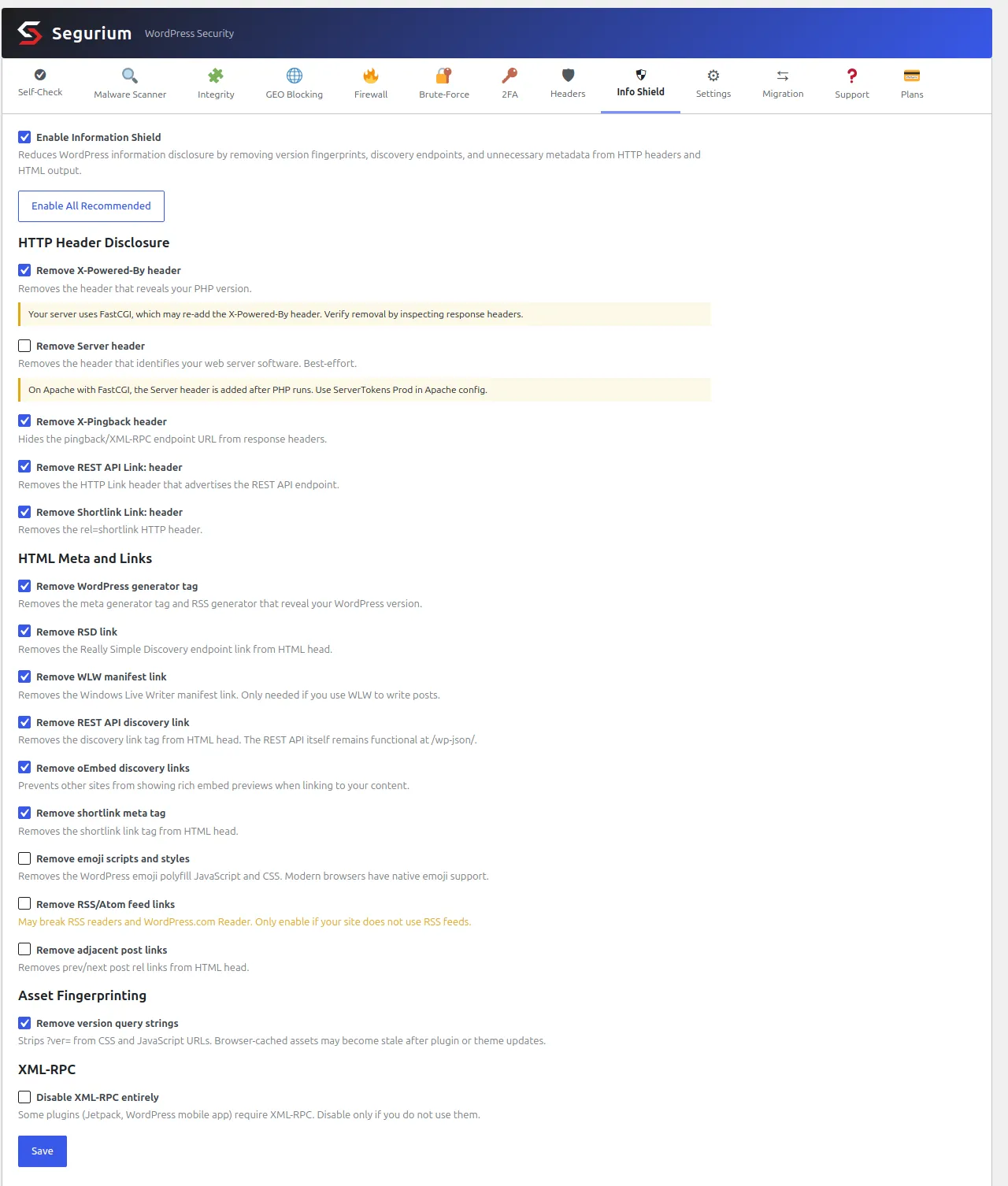
Enable All Recommended sets the master switch and puts every toggle back to its shipped default, which is fourteen on and two off. The two it leaves off are the two that break things: RSS and Atom feed links, and XML-RPC. The button does not save. Press Save afterwards or nothing is written.
The amber bars come from a live check. The plugin reads
SERVER_SOFTWARE and the PHP SAPI when the tab loads, and
raises a warning on each toggle it cannot deliver on your stack. On Apache
with FastCGI it says the Server header is added after PHP runs and points
you at ServerTokens Prod. On nginx it says the toggle has no
effect and points at server_tokens off;. On IIS it names
removeServerHeader in web.config. A third
warning appears next to XML-RPC when Jetpack is active, because that
combination breaks the connection.
One toggle is a leftover. The WLW manifest removal has nothing to remove on current WordPress, for the reason given in the inventory above. It is harmless and it does nothing.
All sixteen toggles ship in every install at no cost, alongside the rest of the hardening features.
What still identifies your version
Read this before you decide the work above was enough. WordPress.org publishes the md5 of every file in every release, at a public endpoint that needs no key and no account.
curl -s "https://api.wordpress.org/core/checksums/1.0/?version=7.0.4&locale=en_US"That returned 3,945 file hashes for 7.0.4, 3,349 for 6.9.1 and 3,230 for 6.8.3. Anyone can download the lot for every release ever shipped. Your static files are served to anyone who asks. So the fingerprint is one GET and one lookup:
curl -s https://example.com/wp-includes/js/wp-emoji-loader.min.js | md5sum
Measured on the checked install, that file hashed to
ba5ff0c719..., both read from disk and fetched over HTTP. The
published manifests give ba5ff0c719... for 7.0.3 and 7.0.4,
and ae9cf8c2d1... for 6.9.1, 7.0, 7.0.1 and 7.0.2. One
anonymous request, and the install is down to two candidate releases. The
generator tag was already removed at that point and made no difference.
Three more things narrow it further, and none of them is stopped by anything on this page.
- Different files split at different points.
wp-includes/css/dist/block-library/style.min.csshas a distinct hash for 6.8.3, for 6.9, for 6.9.1 and for the whole 7.0 line. Combine two files and you intersect two candidate sets. Pick your files well and a handful of requests gets you to one release. - A file that exists is a signal too. WordPress 7.0.1 shipped six
files that 7.0.2 does not, one of them
wp-includes/js/dist/sync.min.js. A 200 or a 404 on that URL separates the two without hashing anything. - Your rendered pages change between releases. A block theme prints core block stylesheets inline, with ids and content that move release to release, and the enqueued asset paths move with them. Someone matching rendered markup does not need a file at all.
There is one honest limit on the other side. Between two patch releases the difference can be almost entirely PHP, which nobody outside your server can read. 7.0.2 and 7.0.4 differ in 19 files and only four of them are fetchable: two admin scripts and the emoji loader in minified and unminified form. So a stranger can usually place you on a branch, and only sometimes on an exact release.
A branch is enough for the question an attacker is asking. Whether your site sits on a line with a published vulnerability does not depend on your patch number. Keep the tag off, and stop short of believing you have gone invisible.
The same public manifest works in your favour too. Every byte of core is known, so anything on your site that disagrees with it is either your edit or somebody else's, which is what checking core files against upstream is built on.
The toggles that break things
Four of the changes on this page have consequences beyond a quieter head section. Two of them the plugin ships switched off for that reason.
- Disabling XML-RPC breaks Jetpack and the WordPress mobile app.
Both authenticate through
xmlrpc.php. The plugin says it plainly on the toggle: "Some plugins (Jetpack, WordPress mobile app) require XML-RPC. Disable only if you do not use them." Jetpack running on your site raises a second warning next to the switch. If you post from a phone, or use Jetpack for backups, statistics or social sharing, leave this alone. - Removing feed links breaks feed readers and the WordPress.com Reader. The shipped warning reads "May break RSS readers and WordPress.com Reader. Only enable if your site does not use RSS feeds." What actually goes is the autodiscovery: the feed itself still returned 200 with the setting on. A reader that already has your feed URL keeps working. Anyone trying to subscribe by pasting your home page address cannot find it any more, and neither can the services that use autodiscovery to pick your content up.
- Removing oEmbed discovery kills your rich previews. When someone links to your post from another WordPress site, or pastes it into the block editor, those two tags are what turn the URL into a card with your title and image. Take them out and your link renders as a bare URL everywhere that relies on them.
- Stripping the version query serves stale assets. Covered above. It is the item on this page most likely to produce a bug report you cannot reproduce.
If something does break, revert one change at a time rather than the whole file. Every item here is independent, which is the argument for putting them in one must-use plugin as separate lines instead of pasting a thousand-line snippet from a forum.
Questions
- Does hiding the WordPress version make my site safer?
- Slightly, and only against one thing: a mass scan that builds its target list by reading the generator tag before it fires anything. Take the tag away and you drop out of that list. Nothing else changes. An exploit that works against your version works exactly as well when the version is hidden, because the exploit does not ask first. Treat this as noise reduction and keep updating.
- Can an attacker still work out my version?
- Yes, and it takes two requests. WordPress.org publishes the md5 of every file in every release at a public endpoint: 3,945 files for 7.0.4 alone. Fetch one static file from your site, hash it, look it up. Measured on the install this page was checked against, wp-includes/js/wp-emoji-loader.min.js separated 7.0.3 and 7.0.4 from everything from 6.9.1 to 7.0.2, and the file served over HTTP hashed to the same value as the published manifest.
- Should I delete readme.html?
- There is less in it than you think. On WordPress 7.0.4 readme.html carries no version number at all, and its published checksum is identical across 7.0 through 7.0.4. Older releases did print the version, so on a site nobody has updated in years it is still worth closing. Deleting the file works until the next core update, which writes it back, because readme.html ships inside the release package. A deny rule in your server configuration survives updates and the file does not.
- Does removing ?ver= break anything?
- It breaks cache-busting. A browser caches a stylesheet by URL. With the version query attached, an update changes the URL and the browser fetches the new file. Strip it and the URL is the same before and after, so a visitor can keep a stale stylesheet or script until their cache expires on its own. On a site you update often, that shows up as broken layout for returning visitors and nobody reports it because it looks fine to you.
- Is disabling XML-RPC part of hiding the version?
- No, and the two get bundled together in almost every guide. XML-RPC publishes no version. What it publishes is a working endpoint: an unauthenticated POST of system.listMethods returned the full method list on the checked install, including pingback.ping, which is the piece used to bounce requests off your site. Disable it because you do not use it, not because it tells anyone your version.
- Why does the Server header survive everything I do?
- Because your web server writes it after PHP has finished. On Apache with FastCGI or PHP-FPM, header_remove() from PHP runs too early to touch it. Measured with every disclosure setting on: every other header went and Server: Apache/2.4.67 (Debian) stayed. It takes ServerTokens Prod in the main Apache configuration, or server_tokens off; on nginx, and on shared hosting that is your host's decision rather than yours.