

Closing the doors
Security headers, and the two that are hard to undo
A response header is an instruction to the browser, so the whole set costs you nothing on the server and narrows what an attacker can do with your pages. Two of them, HSTS and CSP, stay wrong for weeks if you set them carelessly. This page separates the ones you can switch on today from the ones you have to test first.
What each header stops, and what it breaks
Every header below is sent by the server and read by the browser. None of them inspects a request, blocks an IP or scans a file. They shrink what a browser will do with your page, which is why they help after an attacker has already got a script onto it, and why they do nothing about the file the attacker left on disk.
The values in this table are the ones a shipped Recommended preset sends, read from the source and confirmed against a live response. Treat them as a starting point that is known to work on a stock WordPress install.
| Header | Typical value | What it stops, and what a wrong value breaks |
|---|---|---|
X-Content-Type-Options | nosniff |
Stops the browser guessing a file's type from its bytes. An
upload served as text/plain then cannot execute as
script. Breaks nothing on a correctly configured server, and
exposes one that sends the wrong Content-Type: a
stylesheet labelled text/plain stops being applied
instead of silently working.
|
X-Frame-Options | SAMEORIGIN |
Stops another site loading your pages in a frame and stacking an
invisible layer over your buttons. DENY also blocks
your own frames, which breaks theme previews, some page builder
editors and any dashboard that embeds your site in itself.
|
X-XSS-Protection | 0 |
Turns off a legacy reflected-XSS filter that only old browsers
carry. See the reasoning below the table. The values
1 and 1; mode=block switch that filter
back on, which is the wrong direction.
|
Referrer-Policy | strict-origin-when-cross-origin |
Stops the full URL of the page you are on being handed to every
third-party host you link to or load from, which is how admin,
preview and password-reset URLs leak. no-referrer
breaks analytics attribution and a few payment gateways that
check the referring page. unsafe-url sends
everything and is the one value a scanner marks as a failure.
|
Permissions-Policy | 12 features, most denied | Stops a script on your page reaching the camera, microphone, location or payment API, whoever put the script there. Denying a feature your site actually uses breaks it with no error a visitor can act on: a store locator stops finding people, a webcam upload field stops opening, an off-site payment sheet stops appearing. |
Strict-Transport-Security | max-age=31536000; includeSubDomains |
Stops a browser that already knows your site from ever trying
plain HTTP, which closes the window a network attacker uses to
strip TLS. Its own section below, because a wrong value here
takes your site off the internet for the length of the
max-age.
|
Content-Security-Policy | see the CSP section | Names the origins your page may load code from, so an injected script has nowhere to fetch from and nowhere to send to. The hardest header on this page to get right and the easiest to break a site with. Never enforce one you have not run in report-only mode first. |
Cross-Origin-Opener-Policy | same-origin |
Cuts the link between your page and any window that opened it or
that it opened. Breaks OAuth and social login flows built on a
popup that talks back through window.opener.
|
Cross-Origin-Resource-Policy | same-origin | Stops other sites embedding your images, fonts and scripts. Breaks your own second domain, a subdomain that pulls assets from the main site, and anything a CDN fetches on a visitor's behalf. |
Cross-Origin-Embedder-Policy | not set |
Left off by every preset on purpose. require-corp
blocks every third-party embed that does not opt in, so one value
removes your YouTube videos, your map, your font host and your
ad tags at once. Turn it on only when you need cross-origin
isolation for a specific browser API.
|
X-DNS-Prefetch-Control | off | Stops the browser resolving hostnames it merely found in your markup, which otherwise tells a network observer where the page points before anyone clicks. Costs a few milliseconds on the first connection to each third-party host. |
Cache-Control | no-store on admin pages | Keeps a logged-in admin page out of the browser cache and out of any proxy in between, so the back button after logout does not show it. Applied to the whole site instead, it removes your page cache and your hosting bill notices. |
Why X-XSS-Protection should be zero
This one looks backwards on every scanner report, so it is worth the paragraph. The header controlled a filter that old versions of Internet Explorer, Edge and Chrome ran over each response, looking for a script that appeared in both the request and the page. Browsers dropped that filter years ago because it was steerable. An attacker who could put text into a URL could make the filter delete a script of their choosing, including one whose job was to make the page safe, so the defence became the attack. The blocking variant added a second problem: whether a page blanked or not was an answer an attacker could read across origins.
Sending 0 is an instruction, and leaving the header out is
not the same thing. Omit it and a browser that still ships the filter
falls back to its own default, which turns the filter on. So the modern
value is the header present, set to zero, with a real
Content-Security-Policy doing the job the filter pretended
to do.
Send them by hand: Apache, nginx, PHP
Pick one layer and use it. Two layers sending the same header is the single most common way these end up wrong, and the last section shows what that looks like.
Apache, in .htaccess
This needs mod_headers. Check with
apache2ctl -M | grep headers over SSH, or trust the
IfModule wrapper below to keep the site up if the module is
missing. Put the block in the .htaccess file in your
WordPress root, above the # BEGIN WordPress line. WordPress
rewrites everything between its own markers whenever you save the
Permalinks screen, so anything you park in there disappears without
warning.
<IfModule mod_headers.c>
  Header always set X-Content-Type-Options "nosniff"
  Header always set X-Frame-Options "SAMEORIGIN"
  Header always set X-XSS-Protection "0"
  Header always set Referrer-Policy "strict-origin-when-cross-origin"
  Header always set Permissions-Policy "accelerometer=(), autoplay=(self), camera=(), encrypted-media=(self), fullscreen=(self), geolocation=(), gyroscope=(), magnetometer=(), microphone=(), midi=(), payment=(), usb=()"
  Header always set Strict-Transport-Security "max-age=31536000; includeSubDomains" env=HTTPS
</IfModule>
Three details in there earn their place. always makes the
rule apply to error responses too, and without it your 404 and 500 pages
go out bare. set replaces any existing value rather than
adding a second copy. env=HTTPS holds the HSTS line back on
plain HTTP, where browsers ignore it anyway and where sending it is a
sign your configuration is not thinking about the difference.
Measured on Apache 2.4.67: that exact block returned all six headers on a
plain .txt file, and the marker test confirmed
env=HTTPS emitted the HSTS line over HTTPS and suppressed it
over HTTP.
LiteSpeed and OpenLiteSpeed read .htaccess as well, so this
block works there. nginx does not read it at all, and an
.htaccess on an nginx host sits doing nothing while you
wonder why the headers never appeared.
nginx, in the server block
nginx has no per-directory configuration file, so this goes in the site's
server block and needs a reload. On managed hosting you will
usually have to ask, or use the PHP method below instead.
server {
    # ... your existing listen, server_name, root, ssl_* lines ...

    add_header X-Content-Type-Options "nosniff" always;
    add_header X-Frame-Options "SAMEORIGIN" always;
    add_header X-XSS-Protection "0" always;
    add_header Referrer-Policy "strict-origin-when-cross-origin" always;
    add_header Permissions-Policy "accelerometer=(), autoplay=(self), camera=(), encrypted-media=(self), fullscreen=(self), geolocation=(), gyroscope=(), magnetometer=(), microphone=(), midi=(), payment=(), usb=()" always;
    add_header Strict-Transport-Security "max-age=31536000; includeSubDomains" always;

    location ~ \.php$ {
        # Repeat the whole list here. See the warning below.
        include fastcgi_params;
        fastcgi_pass unix:/run/php/php8.2-fpm.sock;
    }
}
Read that comment before you paste. nginx inherits
add_header from the enclosing block only while the inner
block declares none of its own. Add a single
add_header inside your PHP location, for a cache header or a
CORS line, and every header from the server block vanishes
for exactly the requests that matter. The symptom is headers that appear
on your CSS and images and never on a page. Repeat the full list in each
block, or install the headers-more module and use
more_set_headers, which does not behave this way.
Then run nginx -t before you reload. These snippets were not
executed for this page, because the install it was checked against runs
Apache.
PHP, in a must-use plugin
Use this when you cannot touch the server configuration. WordPress fires
send_headers while it builds a frontend response, and a
callback there can send anything it likes.
<?php
add_action( 'send_headers', function () {
	header( 'X-Content-Type-Options: nosniff' );
	header( 'X-Frame-Options: SAMEORIGIN' );
	header( 'X-XSS-Protection: 0' );
	header( 'Referrer-Policy: strict-origin-when-cross-origin' );
	header( 'Permissions-Policy: accelerometer=(), autoplay=(self), camera=(), '
		. 'encrypted-media=(self), fullscreen=(self), geolocation=(), gyroscope=(), '
		. 'magnetometer=(), microphone=(), midi=(), payment=(), usb=()' );

	if ( is_ssl() ) {
		header( 'Strict-Transport-Security: max-age=31536000; includeSubDomains' );
	}
} );
A file in wp-content/mu-plugins/ loads on every request and
survives a theme switch, which functions.php does not. Guard
the HSTS line with is_ssl(), because a browser ignores it
over plain HTTP and there is no reason to advertise a policy you are not
serving under.
Two things this route cannot do. It does not cover requests WordPress
does not handle, and the gap is wider than it sounds: on WordPress 7.0.4
a send_headers callback fired on the frontend and did not
fire on wp-login.php, on a logged-in
wp-admin page, or on a REST route. Static files never reach
PHP at all. It also cannot remove a header the server already set, since
Apache and nginx write theirs after PHP has finished. That second point
matters again in the last section.
There is a second hook, the wp_headers filter, which takes an
array and returns it. Both work. Use send_headers when you
want a header on more than the main query response, and keep to one of
them so you have one place to look later.
HSTS, and why max-age is hard to undo
Strict-Transport-Security tells a browser to refuse plain
HTTP for your hostname for the next max-age seconds. The
browser stores that locally. You have no way to reach it and change its
mind. Everything below follows from that one property.
If your certificate expires, or a renewal fails, or you move hosts and
HTTPS is briefly wrong, visitors who have seen your header get a warning
page with no button that takes them through. The site is not slow for
them. It is gone, for as long as the max-age you chose.
So climb the ladder rather than jumping to the top of it. Start at
max-age=300, leave it a day, and watch that nothing on the
site still points at an http:// URL. Move to
86400, then a week, then the year that scanners want. A year
is the right destination and a terrible first step.
# day one
Header always set Strict-Transport-Security "max-age=300" env=HTTPS

# after a week of clean HTTPS, with every subdomain checked
Header always set Strict-Transport-Security "max-age=31536000; includeSubDomains" env=HTTPS
To retract HSTS you serve max-age=0 over working HTTPS and
wait for every visitor to come back and see it. There is no faster path.
That is the whole reason to grow the value slowly.
includeSubDomains reaches names you forgot
The directive covers every host under the domain, whether or not you know
it exists. A staging box on old.example.com, a mail
interface, a webhook endpoint a developer set up in 2021: each one has to
serve HTTPS from the moment a browser sees your header, or it becomes
unreachable for people who visited your main site. Pull your DNS records
and read them before you add this.
If your WordPress site is itself on a subdomain, the header reaches its
siblings. Set includeSubDomains on
shop.example.com and you have made a rule that applies to
shop.example.com's own children, which is usually harmless,
but people reach for the header on a parent domain by copying the same
line upward. The check is the same either way: list the hosts, confirm
each one does HTTPS.
preload is the hardest one to reverse
The preload list is compiled into the browser itself. A hostname on it is HTTPS-only from the first visit, before any header is ever seen, on every machine running that browser build. Removal is a request followed by a wait for release trains to carry it out to users, measured in months, and the entry keeps working in every browser version already installed.
Submission requires max-age of at least one year,
includeSubDomains, the preload token itself, and
a redirect from HTTP to HTTPS on the same host. Meeting those is not a
reason to submit. Submit when you are sure that every hostname under the
domain will serve HTTPS for years, including the ones a colleague creates
next spring. Preset configurations that ship with this header switched on
leave preload off, and so should yours until you have made
that decision deliberately.
Content-Security-Policy, the one that breaks sites
CSP is the only header here that decides what your own page is allowed to
do. Get it right and an injected <script> has nowhere
to load from and nowhere to send stolen data. Get it wrong and your
homepage renders as unstyled text, or your editor stops saving, and the
browser tells the visitor nothing.
Why a strict policy breaks WordPress
The textbook advice is to ban inline code: no
<script> without a source file, no
<style> block, no style= attribute. That
advice was written for applications whose templates you control.
WordPress is not one of those.
Counted on a stock install running Twenty Twenty-Four, a block theme, on
the day this page was written: the homepage carried 27 inline
<style> blocks, 55 style= attributes and
4 inline <script> blocks. The login page carried 8
inline scripts. Not one of the 94 had a nonce on it. Block themes emit
per-block CSS inline by design, page builders write positioning into
style attributes, and the editor ships configuration as inline
JavaScript. A policy of style-src 'self' removes the 82 of
those that are CSS, and the site you get back is the raw HTML.
A nonce is the usual escape from this, and it does not reach far enough
here. A nonce works on a <script> or
<style> element and cannot be attached to a
style= attribute, which is 55 of the 94. Worse, adding a
nonce to a directive makes the browser ignore
'unsafe-inline' in that same directive, so a half-finished
migration is not a partial improvement. It is a white page.
The starter policy, and what it gives up
This is a policy that keeps a normal WordPress install working on day one. It is the default a hardening module ships, and it is a reasonable thing to paste into your own configuration:
default-src 'self'; script-src 'self' 'unsafe-inline' 'unsafe-eval'; style-src 'self' 'unsafe-inline'; img-src 'self' data: https:; font-src 'self' data:; connect-src 'self'; frame-ancestors 'self'
Be clear about the trade. 'unsafe-inline' in
script-src is the part of CSP that stops injected script
running, and this policy gives it away. Someone who can write into a post
body, a widget or a theme option still gets code execution.
'unsafe-eval' is there because editor and builder bundles
still use it.
What survives is worth having anyway. default-src 'self'
keeps the browser from fetching anything off an attacker's host.
connect-src 'self' blocks the exfiltration half, so an
injected script that does run cannot post your form data to another
origin. frame-ancestors 'self' is the modern replacement for
X-Frame-Options and is enforced where the old header is
only advisory. That is a real reduction in what an injection achieves,
short of stopping it.
Report-only, then tighten
Send Content-Security-Policy-Report-Only instead of
Content-Security-Policy. The browser evaluates the policy,
logs every violation to the console, posts a report if you gave it
somewhere to post, and changes nothing about what loads. This is the only
advice on the whole page that cannot break a site.
Header always set Content-Security-Policy-Report-Only "default-src 'self'; script-src 'self' 'unsafe-inline' 'unsafe-eval'; style-src 'self' 'unsafe-inline'; img-src 'self' data: https:; font-src 'self' data:; connect-src 'self'; frame-ancestors 'self'; report-uri https://example.report-uri.com/r/d/csp/reportOnly"Run it for two weeks, and make sure those two weeks contain the things your site does rarely: an author writing a post in the editor, a customer reaching checkout, whatever your contact form embeds, the analytics tag your marketing person added and did not tell you about. A policy tested only on the homepage will break the checkout on the day you enforce it.
Then read the reports and tighten in this order, one change at a time, each one back to report-only for a few days:
- Add the hosts you actually use. Fonts, maps, video, payment frames. Every violation report names the origin it wanted, so this part writes itself.
- Drop
'unsafe-eval'. Fewer things need it than the default assumes, and it costs you nothing to find out under report-only. - Narrow
img-src. Thehttps:in the starter policy allows any image from any HTTPS host. Replace it with the two or three you use. - Attack
script-srclast. Removing'unsafe-inline'is the change that pays, and it is the one that needs the editor, the theme and every plugin to cooperate.
The report-uri directive is deprecated in the specification
in favour of report-to and a
Reporting-Endpoints header, and it is still the form most
widely handled. Send both if you use a collector that supports the newer
pair. For a first pass, the browser console in devtools shows the same
violations and needs no endpoint at all.
One more habit worth building. When a violation report names a script origin you have never heard of, that is not always a plugin you forgot. It can be the first sign that something wrote into a file it should not have, and the cheapest next step is to check core, plugin and theme files against upstream.
SameSite on the login cookies
WordPress sets its authentication cookies with Secure and
HttpOnly and no SameSite attribute. Verified on
7.0.4: every copy core writes carries
secure; HttpOnly and stops there. Browsers apply their own
default when the attribute is missing, and defaults change between
browsers and between releases. State it yourself.
SameSite=Lax means the cookie travels on a top-level
navigation from another site, and not on a cross-site form post, and not
on a cross-site subresource request. That kills the classic attack where
a page you visit quietly submits a form to your admin using your session,
while leaving "click the link in the email and land logged in" working.
Lax is the right value for almost every WordPress site.
SameSite=Strict means the cookie is never sent on any
request that started somewhere else, including a plain click on a link.
Count the cost before you pick it:
- Off-site checkout. A customer goes to the payment provider, pays, and gets redirected back to your thank-you page. That return is a cross-site navigation, so the session cookie stays home. The customer lands as a stranger on a page that expects to know them.
- SSO and OAuth returns. Same shape. The identity provider sends the browser back to your callback URL, and your callback cannot see the session it created before it sent the user away.
- Links from anywhere. An editor clicking a post link from Slack or an email arrives logged out, logs in again, and stops believing the site.
Pick Strict only for a site with no external payment flow, no SSO, and an admin audience small enough to warn.
Adding the attribute yourself
There is no core setting for this and no filter on the attribute, so the
clean fix is at the server, where it also covers cookies set by plugins
you did not write. This rewrites every Set-Cookie that has
no SameSite and leaves the ones that already do alone:
<IfModule mod_headers.c>
  Header always edit Set-Cookie "^((?!.*SameSite).*)$" "$1; SameSite=Lax"
</IfModule>
Measured on Apache 2.4.67 against a real login: WordPress emitted five
Set-Cookie lines, three of them without the attribute, and
the rule added SameSite=Lax to those three without touching
the two that already carried it. The nginx equivalent is
proxy_cookie_flags ~ samesite=lax; on nginx 1.19.3 or newer,
which was not run for this page.
Never reach for SameSite=None to make a broken flow work.
Browsers reject None without Secure, and on an
authentication cookie it switches the protection off entirely, which
leaves you exactly where you started before you read this section.
Read the headers back
Do not trust the configuration file. Read the response. One command from your own machine settles it:
curl -sI https://example.com/That sends a HEAD request. For a site behind a cache or a proxy, prefer the GET form, because a layer in front of you can answer HEAD differently from the page a visitor gets:
curl -s -D - -o /dev/null https://example.com/Two things about the output surprise people. Over HTTP/2 the header names come back lowercase, because that is the wire format and not a mistake in your configuration. And the order tells you nothing, so do not read anything into it.
On a local site with a self-signed certificate, add -k to
skip the certificate check. On the install this page was checked against,
curl -skI returned the seven headers a Recommended preset
sends and nothing else.
Check more than the homepage. The four URLs below cover the four places coverage usually differs, and a run that shows the same set on all of them is the result you want:
for path in / /wp-login.php /wp-json/ /wp-includes/js/wp-embed.min.js; do
  echo "== $path"
  curl -s -D - -o /dev/null "https://example.com$path" \
    | grep -iE "^(x-frame|x-content|x-xss|referrer|permissions|strict-transport|content-security)"
done
A header on the homepage and not on the static JavaScript file means you configured it in PHP. A header everywhere including the static file means it is in the server configuration. That single difference tells you which layer you are looking at before you open any file.
In the browser
Open devtools, go to the Network panel, reload the page, and click the first row, which is the document itself. The Response Headers list is on the right in Chrome and Edge, and under the Headers tab in Firefox. Both have a raw view if you want the unparsed text.
The Console panel is where CSP work happens. A blocked or reported resource prints a line naming the directive that caught it and the URL it wanted, which is the same information a violation report carries and is enough to build your allow list from while you are still in report-only mode.
The same set from one screen
Everything above is a text file you maintain. The Headers tab does the same job from the WordPress admin, which matters most on managed hosting where you cannot reach the server configuration at all.
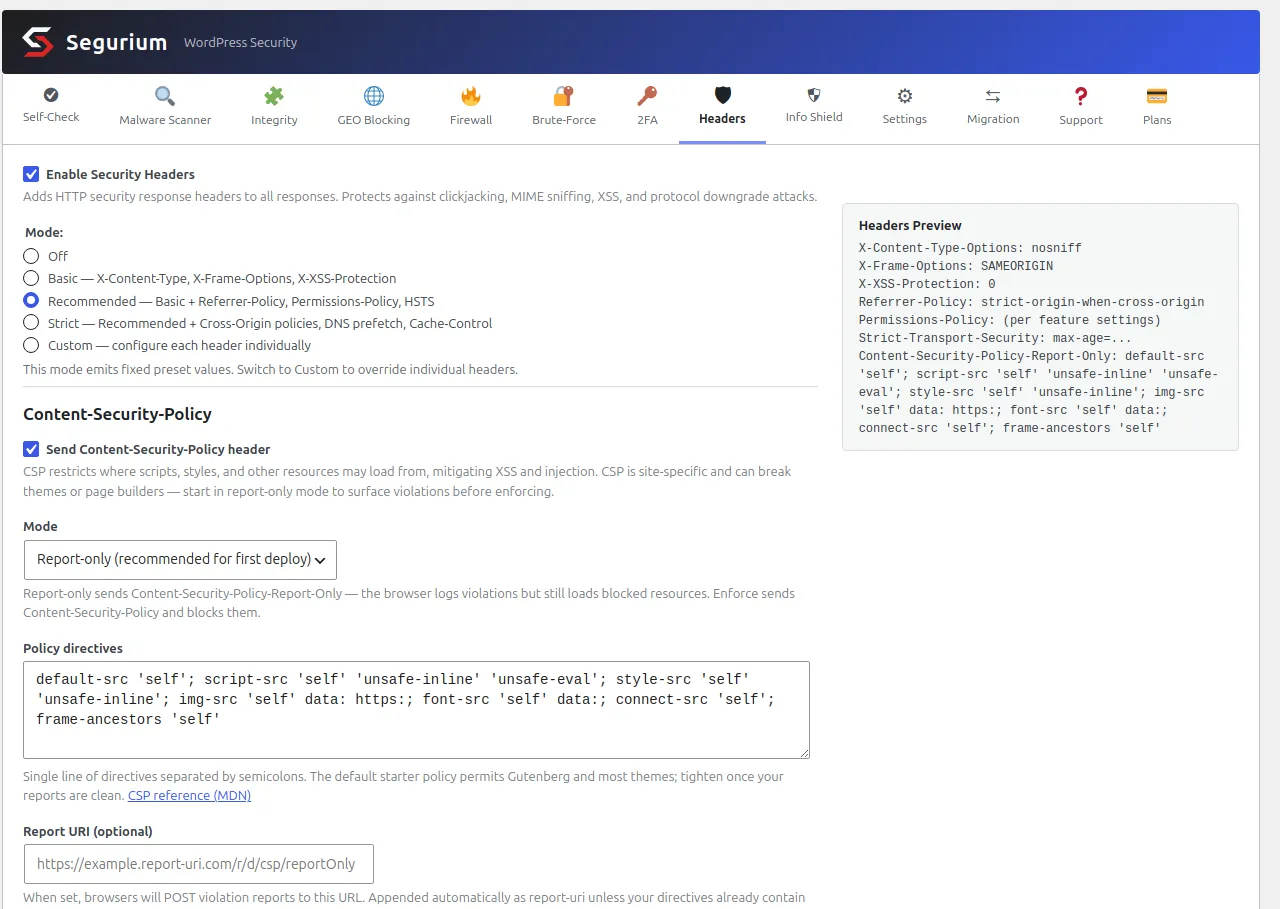
Five modes, and each one is a fixed set rather than a suggestion. Basic
sends the three that cannot break anything:
X-Content-Type-Options, X-Frame-Options and
X-XSS-Protection. Recommended adds
Referrer-Policy, Permissions-Policy and HSTS
when the site is on TLS. Strict adds the two cross-origin policies, DNS
prefetch control and the admin cache headers. Custom opens every value
for editing and is the only mode that exposes
Cross-Origin-Embedder-Policy.
A preset ignores whatever you left behind in Custom, and that is deliberate. On the install in the screenshot the stored custom values include both cross-origin policies and the DNS prefetch setting, and none of the three appeared in the response, because the mode was Recommended. Switching to a preset always gives you that preset's full set, with no residue from an afternoon of experimenting.
The preview panel on the right redraws as you click, before you save. It is the cheapest way to see that Strict is four headers more than Recommended, and it prints the CSP exactly as it will be sent, including the report URI appended to the end of your directives.
CSP has its own switch, separate from the mode ladder, and it starts in report-only. Turning the header module on does not start sending a policy. That split exists because CSP is the one header here that can take a working site down, and the two decisions should not share a button.
What it does about a header your server already sends
Before sending anything, the module reads the list of headers PHP has
already queued and skips every name that is on it. Demonstrated live: a
small must-use plugin set Referrer-Policy: no-referrer early
in the request, and the response came back with one
Referrer-Policy line carrying that value, not the preset's.
So another plugin's header wins, and you get one line instead of two.
The limit is worth knowing, because it is where duplicates come from.
That list only contains what PHP set. Apache and nginx write their
headers after PHP has finished, so nothing running inside WordPress can
see them. Measured with Header always set X-Frame-Options
"DENY" in an .htaccess over a PHP file sending
SAMEORIGIN: the response carried DENY, the PHP
page's own view of its headers still said SAMEORIGIN, and
neither side knew about the other. Swap set for
add and both go out. Configure headers in one layer.
The whole header set ships in every install at no cost, alongside the rest of the hardening features.
What still bites you afterwards
A duplicate header, and how to find its source
A duplicate looks like exactly what it is. Two lines, same name, different values:
x-frame-options: SAMEORIGIN
x-frame-options: DENY
Two sources are sending it, usually a server block and a plugin, or two plugins, or a proxy in front of both. Find the layer with one request for a static file:
curl -s -D - -o /dev/null https://example.com/wp-includes/js/wp-embed.min.js \
  | grep -i x-frame-options
No PHP runs for that URL. A header that still appears there comes from
the server configuration or from something in front of it, and a header
that appears on a page and not here comes from PHP. Remove one source
rather than working out which value the browser prefers, because the
answer differs between headers and between browsers, and the one case
with a defined answer is the painful one: two
Content-Security-Policy headers are each enforced
independently, so your page has to satisfy both at once and breaks in
ways neither policy alone explains.
The syntax that changed under you
Permissions-Policy replaced an older header called
Feature-Policy, and the value format changed with it. The
old form was camera 'none'; microphone 'none'. The current
form is camera=(), microphone=(). A value copied from a post
written before the change is invalid, so browsers discard it, and your
scanner reports the header as present while it does nothing. If your
Permissions-Policy contains a quoted 'none', it is the old
syntax.
Coverage, measured rather than assumed
Whichever route you took, check where the headers actually land. On the
install used for this page, headers configured in PHP appeared on
frontend pages and were absent from wp-login.php, from a
logged-in admin screen and from a REST route. That is a large part of
your site, and the login page is the one an attacker spends the most time
on. Server-level configuration reaches all of it, including the static
files, which is the argument for the .htaccess or nginx
route whenever you can use it.
What these headers still do not do
They constrain the browser. They do not read a request, do not stop a
login attempt, and do not look at a file on disk. A backdoor in
wp-content/uploads keeps working while your scanner grade
goes up. Add these alongside the rest of the hardening work rather than
in place of it. The closest neighbour to this page is
what your responses give
away about your version, which is the same surface read for a
different purpose.
One habit closes the loop. After any change to a theme, a page builder or a payment plugin, re-run the four-URL loop from the verification section. Headers are configuration, and configuration drifts quietly.
Questions
- Will security headers fix a hacked site?
- No. Every header on this page is an instruction to the browser. None of them touches the server, so none of them removes a backdoor, a rogue admin user or an injected file. What they buy you is narrower: they stop your pages being framed on someone else's domain, stop an uploaded file being executed because a browser guessed its type, stop your admin URLs leaking in the Referer header, and stop a downgrade to plain HTTP. If the site is already compromised, clean it first and add the headers afterwards.
- Should X-XSS-Protection be 0 or 1?
- 0. The header controlled a reflected-XSS filter that only old browsers had. That filter had bugs an attacker could steer: it could be tricked into removing a script that made a page safe, which turned the defence into the attack, and the blocking variant leaked whether cross-origin content matched a pattern. Sending 0 tells anything that still ships the filter to leave your pages alone. Leaving the header off is not the same, because a browser with the filter then uses its own default, which is on. The header being present with the value 0 is what a scanner should credit.
- Why do my headers disappear on the login page?
- Because a PHP hook only runs where WordPress runs it. Measured on WordPress 7.0.4: a callback on send_headers fired on the frontend and did not fire on wp-login.php, on a logged-in wp-admin page, or on a REST route. Static files never touch PHP at all, so they get nothing either. If you need the headers everywhere, put them in the server configuration. That is the whole argument for the .htaccess or nginx route over the PHP one.
- Can I run a CSP without breaking the block editor?
- Yes, if you keep 'unsafe-inline' in style-src and script-src. Counted on this install with Twenty Twenty-Four active: the homepage carried 27 inline style blocks, 55 style attributes and 4 inline script blocks, and not one of them had a nonce. Core has no nonce plumbing for those, so a policy without 'unsafe-inline' removes the site's own CSS and JavaScript. Run report-only for a couple of weeks first, through a real editing session and a real checkout, and read the violations before you enforce anything.
- Is includeSubDomains safe on my domain?
- Only if every host under it already serves HTTPS. The directive covers names you may have forgotten: an old staging box, a mail interface, a webhook endpoint, a subdomain a colleague set up. Each one becomes unreachable the moment a browser that saw your header tries to open it over plain HTTP, and the user cannot click through the warning. List your DNS records first. If your site itself sits on a subdomain, the header you set reaches the parent domain's other children too.
- Two copies of the same header came back. Which one wins?
- Do not reason about it, remove one. The outcome differs by header and by browser, and the one case with a defined answer is the worst one: two Content-Security-Policy headers are each enforced independently, so the page has to satisfy both and breaks in a way neither policy explains on its own. To find the extra source, request a static file such as a .txt or an image. No PHP runs for that request, so anything you still see comes from the server configuration or a proxy in front of it.