

Closing the doors
The attacks on wp-login.php, and the two doors beside it
Your log fills with POSTs to one file, so you install something that limits login attempts and consider it handled. WordPress authenticates on three surfaces, not one, and where you put the limit decides whether the attack costs the attacker anything or costs you.
What a lockout stops, and where it runs
Rate limiting a login form solves one problem. It caps how many passwords an attacker can try per hour against your site, which is what makes guessing a working attack in the first place. Take the rate away and a six-character password that falls in an afternoon takes years instead.
It solves nothing else. A password that already leaked in someone else's breach still works on the first try. A stolen session cookie never touches the login form. A vulnerable plugin that lets a request create an administrator does not authenticate at all. So a lockout is a throughput control, and you should size your expectations to that. The thing that makes a correct password useless to a stranger is a second factor, and that page is the other half of this one.
Three doors, and most pages count one
WordPress checks a username and a password on three surfaces that reach the same function. A limiter that recognises only the first leaves the other two open at full speed.
| Surface | What an attacker sends | What your access log shows |
|---|---|---|
wp-login.php | A form POST with log and pwd. | 200 on a wrong password, 302 on a
right one. Both measured.
|
xmlrpc.php |
An XML body naming a method such as
wp.getUsersBlogs, with the credentials as the first
two parameters. No cookie, no form, no page render.
| 200 either way. The verdict is a fault code inside
the response body, which your log never sees.
|
/wp-json/ with an Application Password |
An Authorization: Basic header on any REST route.
Available on every WordPress since 5.6.
| 401 on a wrong password. Twenty in a row took no
longer than one.
|
There is a fourth shape worth knowing about even though it has no fixed URL. Any theme or plugin that renders its own login form, a WooCommerce account page or a login widget, calls the same authentication function from its own address. So does any admin AJAX endpoint that checks a password before it does anything else. A limiter that decides which requests to count by looking at the URL cannot see either of them.
The XML-RPC amplification story has an ending
Search results on this subject still say that
system.multicall turns one HTTP request into hundreds of
guesses. That was true and it is worth knowing why it stopped being true,
because it changes what you should do about the file.
WordPress 4.4 added a flag to the XML-RPC server that trips on the first
failed credential check in a request. Every later check in the same
request short-circuits without ever reaching the authentication function.
Measured on WordPress 7.0.4: a system.multicall carrying a
wrong password followed by the correct password for the same real account
returned fault 403 for both entries. The same correct
password sent on its own succeeded, and a multicall carrying it twice
succeeded twice. One guess per request, and the batch buys nothing.
That removes the amplifier and leaves the door. XML-RPC still accepts
unlimited requests one after another with no form to render, no cookie to
carry and no core throttle. Twenty sequential wrong guesses returned
twenty HTTP 200 responses with no delay between them. Count
it, and rate limit it, at the same level as the login form.
Where the block runs is most of its value
Two rules can refuse the same request and cost the attacker completely different amounts.
- In the web server. Apache or nginx reads its own configuration,
answers
403, and the request is over. PHP never starts. No interpreter, no plugin loading, no database connection. A thousand blocked requests a minute cost you a rounding error. - Inside WordPress. PHP started, WordPress bootstrapped, every active plugin loaded, the options table was read. Only then does anything decide to refuse. The guess is stopped and the cost of the request is already spent. On a small hosting plan a sustained attack can exhaust your PHP workers while every single attempt is being correctly denied.
Say plainly what that means for any WordPress plugin, this site's included. A plugin lockout is the second kind. It runs after PHP booted and after WordPress loaded, because that is the only place a plugin exists. It stops the guessing, which is the point, and it does not save you the request. No plugin installed inside WordPress can, and any that implies otherwise is describing a service in front of your site rather than code on it.
This is also why the two controls are complements. The server rule is cheap and blunt and needs you to know an address in advance. The in-WordPress lockout is expensive per request and works against addresses nobody could have listed. Neither replaces the other.
Count the attack in your access log
Before you configure anything, find out what your server is receiving. Most people guess this from the login notification emails and get the scale wrong in both directions.
Find the log first. On a plain Debian or Ubuntu stack it is one of these two. On shared hosting it usually sits in your home directory, and the control panel names it.
ls -l /var/log/apache2/access.log /var/log/nginx/access.log 2>/dev/null
ls -l ~/logs/*access*log 2>/dev/null
Both servers write the combined format by default, so the fields are in the same places: the client address first, the request method sixth, the requested path seventh, and the status code ninth.
Do not grep for the filename
The obvious command is wrong and it is wrong by an order of magnitude.
Every stylesheet and script the login page pulls in carries
wp-login.php in its Referer field, and that
field is on the same line.
grep -c "wp-login.php" access.logOn the install this page was checked against, that returned 360. The number of actual login submissions in the same file was 24. Scope the match to the fields that mean what you think they mean.
awk '$6 ~ /POST/ && $7 ~ /^\/wp-login\.php/ { print $1 }' access.log \
  | sort | uniq -c | sort -rn | head -20
That prints a count per client address, busiest first. Nothing in it needs GNU awk; it was checked under mawk 1.3.4. A handful of attempts from your own address is you. Four hundred from one address you do not recognise is a bot. Several thousand spread one or two apiece across hundreds of addresses is a distributed run, and that shape matters later because no per-address threshold will ever see it.
Count both doors together
Add XML-RPC to the same pass. An attacker who finds the login form rate limited moves to the file next door, and if you only ever counted one of them you will conclude the attack stopped.
awk '$6 ~ /POST/ && ($7 ~ /^\/wp-login\.php/ || $7 ~ /^\/xmlrpc\.php/) { print $1 }' access.log \
  | sort | uniq -c | sort -rn | head -20
Then read the status codes, because on one of these two surfaces they tell you something and on the other they tell you nothing.
awk '$6 ~ /POST/ && $7 ~ /^\/wp-login\.php/ { print $9 }' access.log | sort | uniq -c
awk '$7 ~ /^\/xmlrpc\.php/ { print $9 }' access.log | sort | uniq -c
A failed login on wp-login.php answers 200,
because WordPress re-renders the form with an error on it. A successful
one answers 302 and sends the browser to
/wp-admin/. Both measured. So a 302 from an
address that just produced forty 200 responses is somebody
guessing your password and then getting it, and that is the single most
urgent line in the whole file.
XML-RPC gives you none of that. Every response is 200,
success and failure alike, with the verdict buried in the XML body. All
27 XML-RPC lines in the checked log, correct credentials and wrong ones
together, were 200. Judge that surface by volume and by
timing only.
See the shape over time
One number tells you the total. The distribution tells you whether it is a burst or a background hum, which decides how long your counting window needs to be.
awk '$6 ~ /POST/ && $7 ~ /^\/wp-login\.php/ {
  split(substr($4, 2), t, ":"); print t[1] " " t[2] ":00"
}' access.log | sort | uniq -c
The substr drops the opening bracket Apache writes in front
of the timestamp. You get one line per hour with a count against it.
Attempts clustered into two or three minutes are one script, and a
30 minute counting window will catch them all in one lockout. Attempts
arriving three an hour for six days are somebody deliberately staying
under a threshold, and no default window sees that.
If you have no shell
Most shared hosting still gives you the file. In cPanel it is under Metrics, "Raw Access", which downloads the same combined-format log gzipped. In Plesk it is under Logs, with a filter you can set to your domain. Either way you can open the download locally and run the same commands against it.
If your panel does not offer it, ask support for 24 hours of the access log for your domain and say you are investigating login attempts. They have it. What you cannot do is get this out of WordPress: core keeps no record of a failed login anywhere in the database, so there is no screen, no export and no query that reconstructs it after the fact.
Block it by hand, cheapest first
Four options, ordered by what they cost the attacker and what they cost you to run. The first two need you to know your own address in advance. The last two do not.
1. Restrict the login file to addresses you name
The cheapest block there is. Apache refuses the request before PHP
starts, so an attacker hammering the file gets a static
403 forever at no cost to your site. Put this in the
.htaccess file in your WordPress root, outside the
# BEGIN WordPress markers so core does not overwrite it.
<Files "wp-login.php">
  Require all denied
  Require ip 203.0.113.4
  Require ip 198.51.100.0/24
</Files>
Apache treats the three Require lines as alternatives, so
any one of them granting access is enough. Measured: from an address not
in the list the file returned 403 while a sibling file in
the same directory still returned 200; from an address in
the list it returned 200. Add
<Files "xmlrpc.php"> with the same body if you do not
use XML-RPC at all.
The nginx equivalent goes in your server block.
location = /wp-login.php {
    allow 203.0.113.4;
    allow 198.51.100.0/24;
    deny all;

    include fastcgi_params;
    fastcgi_pass unix:/run/php/php-fpm.sock;
}
Keep the fastcgi_pass lines. A location block
that matches a PHP file and does not hand it to PHP serves the source of
wp-login.php to anyone you allowed, which is worse than the
problem. The stack behind this page is Apache, so the nginx block above
is the standard form rather than something that was measured here.
This only works if you have a fixed address. Home broadband usually does not, and the day yours changes you are locked out of your own site until you edit the file over SFTP. Naming a whole residential range to avoid that defeats the point. If your address moves, skip to option three.
2. Put HTTP authentication in front of the form
A second password, checked by the web server, before WordPress sees the request. It works from any address, which is what makes it the better option when yours moves, and it costs you a browser prompt on every login.
htpasswd -c /home/you/.htpasswd-wp yourname<Files "wp-login.php">
AuthType Basic
AuthName "Restricted"
AuthUserFile /home/you/.htpasswd-wp
Require valid-user
</Files>
Put the password file outside the web root, as above, or anyone can
download the hashes. Measured: no credentials returned 401,
wrong credentials returned 401, correct credentials returned
200, and a sibling file in the same directory stayed open.
htpasswd ships with Apache and is normally already installed.
Two things this breaks. Basic authentication sends the password on every
request, so run it over HTTPS or you have added a second credential to
leak. And anything that posts to wp-login.php without a
browser, including the WordPress mobile app on some setups, now gets a
401 it does not know how to answer.
3. Switch XML-RPC off, and know what that leaves
If nothing you run uses it, denying the file at the web server is the complete answer and costs nothing.
<Files "xmlrpc.php">
  Require all denied
</Files>
If you cannot edit server configuration, WordPress has a filter. Put this
in a small file under wp-content/mu-plugins/ so no plugin
screen can switch it off by accident.
<?php
add_filter( 'xmlrpc_enabled', '__return_false' );
Measured on WordPress 7.0.4: with that filter active, an authenticated
XML-RPC call using a correct password returned HTTP 405 and
a 405 fault reading "XML-RPC services are disabled on this
site." Credential guessing over XML-RPC is finished.
What it does not do is close the file.
system.listMethods still answered, still listed
pingback.ping, and pingback.ping still ran,
because that method never reaches the login path the filter guards. So
the filter ends the brute force and leaves the pingback reflector that
gets WordPress sites used to hammer third parties. The
<Files> block above closes both. Use the filter when
you have no other option, not by preference.
Before you do either, check what depends on it. Jetpack authenticates over XML-RPC. So do the WordPress mobile apps and several backup and remote-management plugins. They fail with a connection error that names nothing, and you will spend an evening on it in three months.
4. Ban the address at the firewall with fail2ban
The only option here that acts on an attacker you could not have named in advance, and the only one that needs shell access and a service you control. fail2ban watches the log you were just reading and pushes the offending address into the kernel firewall, so subsequent requests never reach Apache at all.
[Definition]
failregex = ^<HOST> .* "POST /wp-login\.php[^"]*" 200
ignoreregex =[wordpress-login]
enabled = true
filter = wordpress-login
port = http,https
logpath = /var/log/apache2/access.log
maxretry = 5
findtime = 1800
bantime = 900
The status code at the end of that pattern is doing the work. A failed
login is 200 and a successful one is 302, so
the filter counts failures and steps over the moment somebody logs in
properly. Checked against real log lines: it matched the
200 failure and did not match the 302 success.
fail2ban is not installed on the stack this page was written against, so
the pattern was validated on its own and the jail was not run.
Do not copy that failregex for XML-RPC. Every XML-RPC
response is 200, right password or wrong, so a rule matching
on the status bans anyone who uses the file, Jetpack and your phone
included. If you want to rate limit XML-RPC this way, ban on volume
rather than on outcome: a low maxretry over a short
findtime, matching every POST to the file, with your own
services allow-listed in ignoreip.
Banning by address is the same decision as any other address rule, and the mechanics of getting the ranges right, and of not banning something you needed, are the subject of writing IP and CIDR rules.
Prove the block is live
Every rule on this page can be silently inert. Apache ignores
.htaccess entirely unless AllowOverride permits
it, nginx never reads one at all, and a filter file dropped in the wrong
directory does nothing forever. Ask the server, from somewhere that is
not your own machine if you allow-listed an address.
curl -s -o /dev/null -w "%{http_code}\n" https://example.com/wp-login.php
Read the answer against what you configured. 403 means the
address rule is live. 401 means HTTP authentication is live.
200 means the login page is being served normally, so
whatever you wrote is not being read.
500 means Apache refused to parse your file, and it returns
that for every request in the directory, not just the one you were
restricting. If your whole site went down the moment you saved
.htaccess, you have a typo rather than a second problem.
A <Files> block closed with
</FilesMatch> produces exactly that, measured.
Then check XML-RPC separately, because it fails differently.
printf '%s' '<?xml version="1.0"?><methodCall><methodName>system.listMethods</methodName><params></params></methodCall>' > call.xml

curl -s -o /dev/null -w "%{http_code}\n" -X POST \
  -H "Content-Type: text/xml" --data-binary @call.xml \
  https://example.com/xmlrpc.php
403 is the server-level deny working. 405 is
the xmlrpc_enabled filter working. 200 means
the file is answering, and you can read the method list in the body to
confirm the XML-RPC server answered rather than a 404 page.
For a lockout that lives inside WordPress there is only one honest test, which is to trip it. Use a username that does not exist, send one more wrong password than your threshold allows, and confirm the next request is refused. Do it from a phone on mobile data rather than from the address you allow-listed, or you will prove nothing and believe you proved something.
Thresholds, tiers and the honeypot
Everything above needs numbers, and the numbers are where most setups go wrong in one of two directions. A threshold of three with a one-hour window locks out your own staff weekly. A threshold of fifty with a five-minute window lets a script try 14,000 passwords a day and never trips.
Four settings decide the behaviour, and they interact.
- Attempts allowed. Five is the working default. It survives a forgotten password, a stale saved password in a browser and a mistyped one, and it caps an attacker at five guesses per window.
- Counting window. How long a failure stays on the record. Thirty minutes is long enough that an attacker cannot wait out the counter cheaply, and short enough that yesterday's typo is not held against you today.
- Lockout duration. Fifteen minutes is the number that does the work. It cuts a sustained attack to twenty guesses an hour, which is the difference between a password falling this week and never, and it costs a locked-out colleague a coffee.
- Escalation. An address that earns repeat lockouts inside a week is not a colleague. Sending the third one to 24 hours costs a real attacker most of a day and is almost impossible for a human to reach by accident.
Resist the permanent ban. The address you would ban forever rarely belongs to one user: mobile carriers put thousands of subscribers behind one, an office puts a whole floor behind one, and shared hosting sends every site's outbound requests from one. A permanent entry keeps evicting people who inherit that address months later, and nothing in your logs will connect the complaint to the rule. Tiered and temporary buys almost all of the protection with none of that.
One design detail worth copying if you build this yourself: count failures per username as well as per address, but always apply the lockout to the address. Counting per username catches a botnet spreading one guess across hundreds of addresses, which no per-address threshold ever sees. Locking the account instead of the address hands anyone on the internet a way to keep your administrator out by guessing at the name.
The honeypot catches what a threshold cannot
A threshold needs an attacker to be repetitive. Against a botnet that makes one attempt per address and never returns, five-in-thirty-minutes is never reached and the attack proceeds at full speed.
A honeypot field catches those on the first request instead of the fifth.
You add an extra text input to the login form, position it far off
screen, mark it aria-hidden, give it
tabindex="-1" and autocomplete="off". A person
never sees it, cannot tab into it and cannot be autofilled into it. A
screen reader skips it. A bot that parses the HTML and fills every input
it finds fills it, and that is a judgement you can make on attempt one
with no counter involved.
Be clear about its limit. A script that posts log and
pwd directly, without ever fetching the form, never touches
the field. The honeypot catches form-filling bots and the threshold
catches the rest, which is why both exist. Neither reaches XML-RPC, where
there is no form to plant anything in.
The same nine settings in one place
Segurium's Brute-Force tab, at
wp-admin/admin.php?page=segurium&tab=bruteforce, is the
configured version of this section. It ships in every install with no
paid tier attached to any of it.
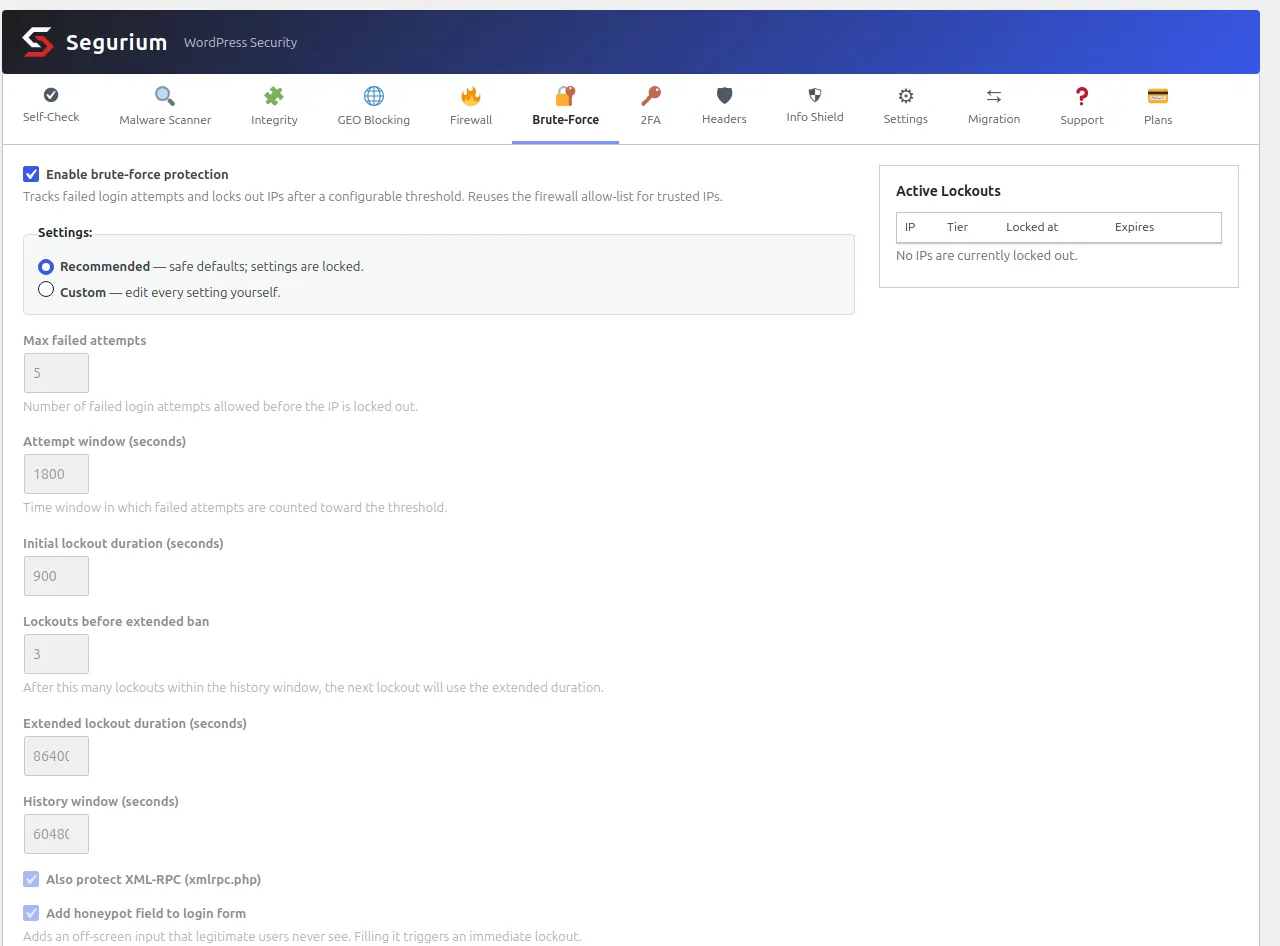
The Recommended radio locks the same four decisions the section above argued for: five attempts, a 30 minute counting window, a 15 minute first lockout, and 24 hours from the third lockout inside a rolling week. XML-RPC is covered by the same counter and the same lockout, so an address that burns its budget on the login form finds the file next door already closed to it. The honeypot goes on the login form on the same switch.
The lockout always lands on the address, never on the account, so the per-username counter cannot be turned into a way to keep an administrator out. The right-hand panel lists whatever is currently locked with an unlock button per row, which is the recovery path for the moment you lock yourself out.
And the honest half. All of that runs inside WordPress, on the hooks that fire once PHP has started and the plugins have loaded. It stops the guess. It does not stop the request, and no code installed inside WordPress can. If blocked login traffic is exhausting your PHP workers rather than threatening your password, the fix is the server-level rule in the first option above, not a bigger plugin.
Nothing on that screen is a paid upgrade. The other defences that ship beside it are listed under hardening on the features page.
What bites you afterwards
Login hardening has a specific failure mode: it works, and then it works on you. Plan the recovery before you need it.
- You are locked out and the block is in Apache. Nothing inside
WordPress can help, because your rule runs first. Edit
.htaccessover SFTP or in your host's file manager and remove the block. This is the reason to keep working SFTP credentials somewhere other than the site. - You are locked out and the block is a plugin. Deactivate it from
the command line,
wp plugin deactivate <slug>, or rename its directory underwp-content/plugins/over SFTP, which WordPress treats as deactivation. Then unlock your address and activate it again. - Your whole office is locked out at once. Everyone shares one outbound address, so a single wrong password spends the budget for the floor. Allow-list the office range rather than raising the threshold for the entire internet.
- Nothing is ever blocked, or everything is. You are behind a proxy or a CDN and the address your code sees is the proxy's. Fix the client address before you touch the threshold, and check it by confirming that a lockout you trip on purpose records the address you expect.
- Something that used to work stopped. Almost always XML-RPC. Jetpack, the mobile app and remote-management plugins all go through it and none of them says so when they break.
The gap that keeps reappearing
One bug shape is worth understanding because it is generic to WordPress and it will keep turning up in whatever you use.
A rate limiter decides which requests to count by looking at the URL. It
recognises wp-login.php and xmlrpc.php and
counts a failure on either. Then a feature authenticates from somewhere
else: an AJAX endpoint that validates a password before showing a second
factor prompt, a theme's own login form, a REST route reading an
Application Password. The limiter's URL test does not match, so it counts
nothing and blocks nothing, and that endpoint answers "wrong password" or
"right password" as many times as anyone asks. An address locked out on
the front door is still welcome at that one.
Two rules fall out of that, and they hold for any implementation. Every place that checks a password has to ask the limiter before it checks and report to the limiter after it fails, whatever URL it lives at. And a verdict is not enforcement until it survives everything that runs after it: WordPress lets several callbacks look at an authentication result in turn, and a core callback further down the chain will re-check the credentials and replace an earlier refusal with a valid user when both fields are filled in. A limiter that returns its refusal early and does not re-assert it will throttle wrong passwords correctly and wave a correct one straight through, which is exactly the case a lockout exists to cover.
Both were live bugs in this plugin, found by reading the authentication chain rather than by testing the login form, and both are fixed in the shipped code. Assume the same shape exists wherever you have not looked, and check what happens on your site when a locked-out address sends the correct password over XML-RPC.
Questions
- Does renaming wp-login.php stop the attack?
- It stops the bots that only ever ask for that one path, which is most of them, and it does nothing to the other two doors. A rename is normally a rewrite rule inside WordPress, so the request still starts PHP and still loads every plugin before anything decides to hide the page. Treat it as noise reduction in your log rather than as a control. If the rename is the only thing standing between an attacker and your password, xmlrpc.php and Application Password auth on /wp-json/ are both still answering under their real names.
- Can I just delete xmlrpc.php?
- You can, and the next WordPress update puts it back. Deny it in the server configuration instead, or switch it off with the xmlrpc_enabled filter. Measured on WordPress 7.0.4: with that filter on, an authenticated XML-RPC call returns HTTP 405 and a 405 fault, so credential guessing over XML-RPC is finished. system.listMethods still answers and still lists pingback.ping, and pingback.ping still runs, because it never calls the login path the filter guards. If the pingback reflector is what worries you, deny the file at the web server.
- Will disabling XML-RPC break anything?
- Jetpack and the WordPress mobile apps both authenticate over XML-RPC, and so do some backup and remote-management plugins. They stop working the moment you deny the file, usually with an unhelpful connection error rather than a clear one. Check what you have connected before you switch it off, and if you need Jetpack, keep XML-RPC and rate-limit it instead of denying it.
- Is a permanent ban better than a 15 minute lockout?
- Almost never, because the address you ban rarely belongs to a single user. Mobile carriers put thousands of subscribers behind one address, offices put a whole floor behind one, and shared hosting sends every outbound request from one. A short lockout costs the attacker their throughput, which is the thing that makes guessing work, and costs a colleague who fat-fingered a password a coffee break. A permanent ban on a carrier address evicts everyone who inherits it next week, and you will not find out from a log.
- Every attacker shows up as the same IP address. Why?
- You are behind a proxy, a load balancer or a CDN, and what your server sees is the proxy rather than the client. Every rule on this page then behaves in one of two useless ways: it blocks nothing, or it blocks the proxy and takes out every visitor arriving through it. Fix the source of truth first. On Apache that is mod_remoteip with the proxy's ranges in RemoteIPTrustedProxy; inside WordPress it is whatever trusted-proxy list your rate limiter offers. Until the real client address reaches the code, do not switch on a lockout.
- Does a CAPTCHA replace a lockout?
- No. A CAPTCHA raises the cost of each guess and a lockout caps how many guesses fit into an hour, and only the second one bounds the attack. A CAPTCHA also only exists on a page a bot has to render, so it is absent from XML-RPC and from every programmatic authentication path. Use it as a speed bump on the form, on top of a threshold, and never as the threshold.