

Closing the doors
Blocking a country, without locking yourself out
A country block asks a database where an address is registered, then refuses the answers you listed. It is good at cutting noise. Against somebody who wants in, it lasts until they open a VPN.
What a country block actually measures
There is no country in a network packet. What you are doing is a lookup: take the address the request arrived from, find the range it belongs to in a database, read the country code somebody wrote against that range. The registries publish who was allocated which block and where that organisation is registered. That is the fact being measured. Where the person sits is not.
Two databases checked on the same day disagreed about
104.16.0.1. One said United States, the other said Canada.
It is a large CDN's address, and the traffic behind it comes from
everywhere. 1.1.1.1 came back as Australia in both, because
that is where the block is registered, while the service on it answers
from hundreds of cities. Neither database is broken. They are recording
registration, and you are hoping to read location.
Where the accuracy goes
- VPNs and proxies. An exit node in Frankfurt makes a request from anywhere look German. An attacker reaches for one before anything else. A country block costs a motivated intruder a single click.
- Mobile carriers. A carrier can route a whole region through one gateway, so subscribers in several countries share ranges registered in one. Roaming customers appear in their home country while standing in yours.
- Cloud and hosting ranges. A provider registers a block in one country and rents it worldwide. Most automated attacks arrive from exactly these ranges, which is why blocking a country and blocking a hosting provider are different jobs. Writing IP and CIDR rules covers the second one.
- Stale allocations. Blocks get sold, split and re-registered. Every database lags the transfer, and a list rebuilt once a month lags it further.
So be honest about what you are buying. A country block is good at cutting automated traffic and log noise from places you have no customers in. Your access log shrinks, your login page stops being hammered from the same few networks, and the machine you pay for stops rendering pages nobody will read. That is a real result and it is worth having.
It is not a defence against anybody who wants in. It does not know who is behind the address, only where the address was registered, and the registration is the one part of the request an attacker can change for free.
Write the rule: Apache and nginx
Doing this by hand has two halves. Getting a current list of the ranges belonging to a country, and turning that list into rules your web server understands. The second half takes ten minutes. The first half never finishes.
Getting the ranges
Several projects publish per-country CIDR files built from the registry allocations. IPdeny publishes one file per country, plain text, one range per line, rebuilt often: the copy fetched for this page carried a timestamp from the same morning. Take the aggregated version. It merges adjacent ranges and gives your server fewer rules to walk.
curl -sO https://www.ipdeny.com/ipblocks/data/aggregated/cn-aggregated.zone
wc -l cn-aggregated.zone
Fetched on the day this page was checked, that file held 5,511 ranges. The unaggregated version of the same country held 8,809. A few other counts from the same run, so you know what you are signing up for:
| Country | Aggregated IPv4 ranges |
|---|---|
| China | 5,511 |
| Russia | 8,641 |
| Germany | 8,713 |
| United States | 29,392 |
| Brazil | 4,950 |
The whole IPv4 set is one archive of 843 KB, 240 country files and 262,681 lines. IPv6 is published separately, and a rule set covering only IPv4 quietly lets IPv6 visitors straight through.
This is the maintenance problem in one sentence. The list you paste today is a photograph of a network that keeps moving. Ranges are transferred every week, and your copy does not update itself. Either you schedule a job that refetches and rebuilds the rules, or you accept that the block decays from the day you install it. Everybody who pastes it once accepts the second option without deciding to.
Apache
Apache 2.4 does this with Require, and a negated
Require has to sit inside a container. Put one beside a
positive Require with nothing wrapping them and Apache
answers 500 for every request in that directory. That was measured, and
it is the most common way this rule goes wrong on the first try.
<RequireAll>
Require all granted
Require not ip 1.0.1.0/24
Require not ip 1.0.2.0/23
</RequireAll>
Build the body of it from the zone file rather than by hand.
{ echo "<RequireAll>"
  echo "Require all granted"
  sed 's/^/Require not ip /' cn-aggregated.zone
  echo "</RequireAll>"
} > block.conf
Two things decide whether that file is usable. The first is
AllowOverride. Require belongs to the
AuthConfig override class, and a host that grants only
FileInfo answers with 500 instead of applying your rule. The
second is cost. Apache re-reads .htaccess on every request in
the directory, and parsing is not free at this size.
Measured on Apache 2.4.67, serving one small static file: 0.7 ms with no
.htaccess, and 90 to 99 ms once the 5,511 line block list was
in place. The file being requested was not even in the blocked ranges. A
second file in the same directory, with the rules scoped so they could
not apply to it, still paid 96 ms. You are paying to parse the list, on
every request, forever.
So put the block in the server configuration if you can reach it. Inside
a <Directory> block in the vhost it is read once when
Apache starts. Ask your host to include the file, or to add the rules
themselves. If .htaccess is the only place you can write,
keep the list short: the ranges you actually see in your log, not a whole
country.
nginx
nginx has no per-directory configuration file, so this needs config
access and a reload. It also has the right data structure for the job.
The geo block compiles your ranges into a lookup tree when
the config loads.
sed 's|$| 1;|' cn-aggregated.zone > /etc/nginx/geo/cn.confgeo $blocked_country {
default 0;
include /etc/nginx/geo/cn.conf;
}Then refuse the matching requests. This one returns 403 for the whole server block.
server {
    listen 80;

    if ($blocked_country) {
        return 403;
    }
}
Check the config before you reload it, always:
nginx -t then nginx -s reload. Measured on
nginx 1.31.3 with 5,512 entries loaded, a request took 0.4 to 0.5 ms,
which is what the same server does with an empty config. The list costs
nothing per request because it was compiled once.
geo reads the address nginx believes the client has. Behind
a load balancer or a CDN that address is the proxy, and the next section
is about fixing that before you trust any of this.
The login only, or the whole site
Decide this before you write the rule, because the two choices have different prices and most people pick the expensive one by accident.
Blocking the whole site refuses every request, including the ones you want. Search crawlers fetch from their own ranges, and those ranges live in countries. Block the country and your pages stop being crawled, with nothing in WordPress to tell you. Payment callbacks, webhooks and uptime monitors run from cloud ranges that may sit in the same place. So does the customer who happens to be travelling.
Blocking the login and the admin costs you none of that. Search engines
have no reason to fetch wp-login.php, webhooks do not post
to /wp-admin/, and no customer needs either. Almost all the
automated traffic you wanted to stop is aimed at exactly those two
places. Unless you have a specific reason to refuse readers from a
country, this is the version you want.
<Files "wp-login.php">
<RequireAll>
Require all granted
Require not ip 1.0.1.0/24
</RequireAll>
</Files>
Measured: the named file returned 403 to a listed address while another
file in the same directory returned 200. For the admin, put a second
.htaccess inside wp-admin/ with the same
RequireAll block and no <Files> wrapper.
One exemption is not optional. wp-admin/admin-ajax.php lives
in that directory and front-end plugins call it for logged-out visitors,
so a blanket block on wp-admin/ breaks parts of your public
site for everybody in the blocked country. Add a
<Files "admin-ajax.php">Require all granted</Files>
section to the same file. Measured: the named file was served while
everything else in the directory was refused.
On nginx the same scoping is a location, with one catch. An exact-match location wins over the regular expression location that normally hands PHP to your interpreter, so this block has to carry that handling itself. Copy those lines from your existing PHP location rather than trusting the socket path below.
location = /wp-login.php {
    if ($blocked_country) {
        return 403;
    }
    include fastcgi_params;
    fastcgi_pass unix:/run/php/php-fpm.sock;
}
Country is a coarse filter on the login even when it works. What actually reduces password guessing is limiting how often any address may try, and that works on every country at once. Stopping brute force on wp-login.php is the rule to write first, with this one as noise reduction on top.
Behind a CDN every request looks the same
If anything sits in front of your server, and today something usually does, your server no longer sees the visitor. It sees the proxy. Apache's documentation states it flatly: "If you are proxying content to your server, you need to be aware that the client address will be the address of your proxy server, not the address of the client, and so using the Require directive in this context may not do what you mean."
Your country lookup then answers with the CDN's country. One of two things happens, and both look like the rule is broken. Either that country is on your list and the rule blocks every visitor you have, or it is not and the rule blocks nobody while the log keeps filling with attempts.
The real address is still there. The proxy puts it in a header, normally
X-Forwarded-For, and your server has to be told to read it
and to trust it from the proxy only.
RemoteIPHeader X-Forwarded-For
RemoteIPTrustedProxy 203.0.113.10
RemoteIPTrustedProxy 198.51.100.0/24
mod_remoteip replaces the client address for the rest of the
request, so your Require rules and your access log both see
the visitor. Every one of its directives is server config or vhost only.
None of them work in .htaccess, so on shared hosting this is
a support ticket rather than a file edit.
set_real_ip_from 203.0.113.10;
set_real_ip_from 198.51.100.0/24;
real_ip_header X-Forwarded-For;
Measured on nginx 1.31.3 with the proxy address trusted: a request
carrying X-Forwarded-For: 1.0.1.5 was refused by a rule
listing Chinese ranges, and the same request carrying
8.8.8.8 went through. With the trusted line removed, both
were judged on the proxy's own address, which is the failure this whole
section is about.
Now the dangerous half. A header is text, and anybody who can reach your
server directly can send whatever they like in it. If you trust
X-Forwarded-For from every address, your country block, your
IP rules and your login limits all become opt-in for the attacker. Trust
it from your proxy's published ranges and nowhere else, and make sure
requests cannot bypass the proxy to reach your origin.
The IP and CIDR
rules page has the same problem with the same fix, because every rule
that reads an address depends on this one being right.
A plugin that blocks inside WordPress has to solve it too, and the shape
of the solution is the same. Take the connecting address. If it is not in
the trusted-proxy list, that is the client and the headers are ignored.
If it is, walk X-Forwarded-For from the right, which is the
nearest proxy, and stop at the first address that is not a trusted proxy.
That address is the client. Reading the leftmost entry instead, as older
code often does, hands the decision to whoever wrote the header.
Prove the rule fires
You cannot originate a request from the country you just blocked, so test the mechanism instead of the geography. Put your own address in the rule, confirm you are refused, then take it back out.
curl -s -o /dev/null -w "%{http_code}\n" https://example.com/wp-login.php
With your address in the deny list that returns 403. Without
it, 200 or a redirect. Both were measured on a live server.
If you get 500, your rule is a syntax error or your host
does not allow those directives in .htaccess, and neither is
a country problem.
Then look at what the rule is catching. On Apache, count the refusals in the access log by address:
awk '$9 == 403 {print $1}' /var/log/apache2/access.log \
  | sort | uniq -c | sort -rn | head -20
That first column of the log is the address your server believes the client had. Behind a proxy without the previous section applied, it is the proxy, and every line will be identical.
To read those addresses you need the reverse lookup: which country does this one belong to. The zone files answer that offline. Unpack the archive and check an address against every country file.
curl -sO https://www.ipdeny.com/ipblocks/data/countries/all-zones.tar.gz
mkdir -p zones && tar xzf all-zones.tar.gz -C zonesimport ipaddress, sys, glob, os
ip = ipaddress.ip_address(sys.argv[1])
for path in sorted(glob.glob(sys.argv[2] + "/*.zone")):
cc = os.path.basename(path)[:2].upper()
if cc == "ZZ":
continue
for line in open(path):
line = line.strip()
if line and ip in ipaddress.ip_network(line):
print(cc)
sys.exit(0)
print("unknown")
Run it as python3 whichcc.py 8.8.8.8 zones. Skip
zz.zone or the answer is always the same: that file is 331
lines of whole-/8 aggregates covering unassigned space, and
a loop that reads it returns ZZ for every address on earth.
The first version of this script did exactly that.
Spot-checked against a second database on the same day, this agreed on
8.8.8.8 (US), 1.0.1.5 (CN),
95.173.136.70 (RU) and 1.1.1.1 (AU), and
disagreed on 104.16.0.1, where one said US and the other CA.
Keep that disagreement in mind when a customer tells you they were
refused from a country you never blocked.
The same block as one setting
Segurium's GEO Blocking tab does this without the zone files or the
server config, at
wp-admin/admin.php?page=segurium&tab=geo.
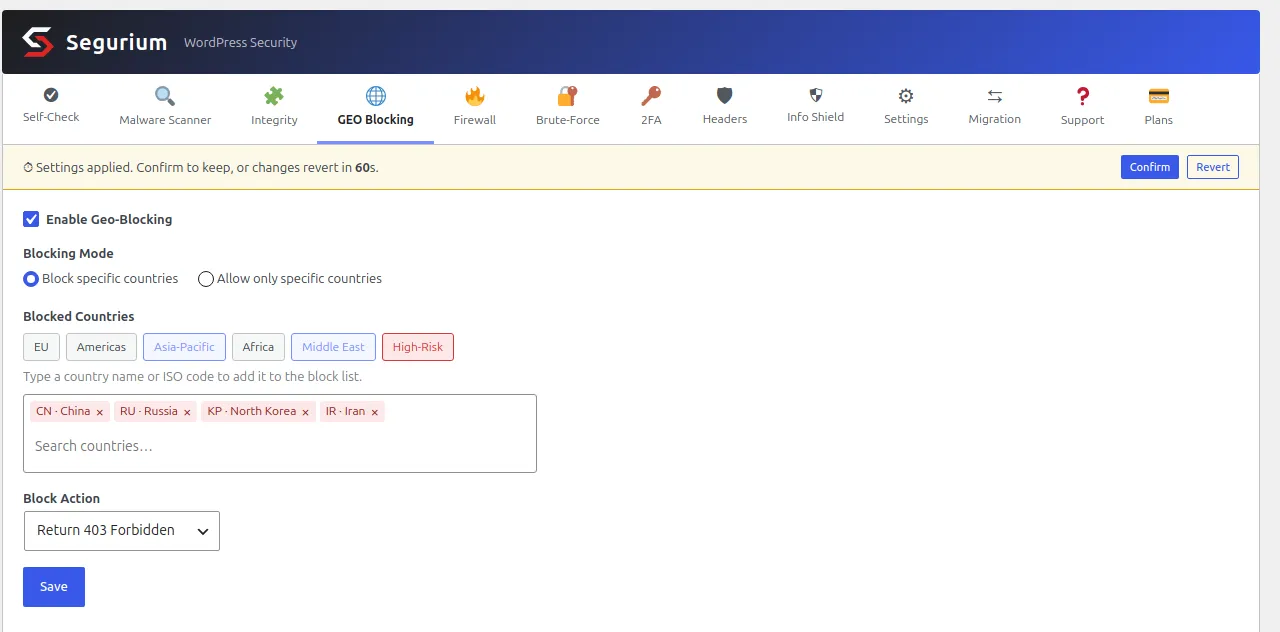
The parts of that screen, in the order you meet them. Blocking Mode picks between refusing the countries you list and allowing only the countries you list. The region buttons are shortcuts that add or remove a whole group in one click: EU, Americas, Asia-Pacific, Africa, Middle East, and a High-Risk preset of eleven country codes. Read the tags a preset adds before you save it. Several of those eleven are large consumer markets, and the button will not tell you that.
Block Action decides what a refused visitor gets: a 403 page, a redirect to a URL you choose, or nothing at all. The country list holds ISO codes, and the search box takes either the code or the country name.
The banner at the top is the part worth copying even if you never install anything. Saving applies the change immediately and stages it for 60 seconds. Confirm makes it permanent. Do nothing and the previous settings come back. Measured end to end on a live install: a request from a blocked address was refused at 2 seconds and at 37 seconds, then served normally at 72 seconds with the block list empty again. The revert does not depend on a background job, because the deadline is checked at the start of the request that would have been blocked. Turning the module off is immediate and stages nothing, so the timer never stands between you and switching it off.
Two limits to know before you rely on it. The check runs inside
WordPress, on the plugins_loaded hook, so PHP has already
received the request and started work before any address is judged. That
is later than an Apache or nginx rule, and it is not an edge block. And
anything your web server delivers without calling PHP is not covered:
measured on a live install, a blocked address got 403 on the home page,
on wp-login.php, on /wp-admin/, on
admin-ajax.php and on the REST API, and 200 on a JavaScript
file under wp-includes/. Images, stylesheets and scripts
keep being served.
The lookup itself reads a local file, so no request leaves your server to answer it, and the file is checked for a newer version daily. The copy downloaded on the day this page was checked held 706,484 ranges in 24 MB, and a first lookup measured between 1.2 and 1.6 ms before caching. Once blocks start happening, a Blocked Requests table appears beside the settings with a count per country. That count is how you find out whether the rule was worth having.
The tab, the country data and the countdown all ship in every install at no cost. What else comes with them is listed under hardening on the features page.
When you block yourself
This is the section to read before you save anything. A country block does not exempt you. Blocking your own country, or allowing only a country you are not currently in, refuses you exactly as thoroughly as it refuses anyone else.
Measured on a live install, with the requesting address resolving to a
blocked country: the home page, wp-login.php,
/wp-admin/, admin-ajax.php and the REST API all
returned 403. There is no logged-in exemption, because the check runs
before WordPress knows who you are.
The trap in allow-only mode
An address the database has never heard of is not treated as neutral.
Loopback and private addresses come back as the reserved code
ZZ, which is a country code as far as the comparison is
concerned, and ZZ is not on your allow list. Measured: with
allow-only mode and one country permitted, a request from
127.0.0.1 was refused. Local health checks, anything looping
back through the server's own address, and internal monitors all fall
into that hole. A block list does not have this problem, because an
unknown code is simply not on it.
WP-CLI falls into it too, which surprises people who assume the command
line is a way around a web block. WP-CLI presents
127.0.0.1 as the remote address, so in allow-only mode
wp refuses to run and prints the block message instead of
your output. That was measured, and it is the moment a recovery plan
stops being theoretical.
Getting back in
- If a confirm timer was involved, wait. Do not clear cookies, do not reinstall anything. Reload once after the countdown ends. The request you make from the blocked address is itself what triggers the revert, and the settings you had before come back.
- With shell access, skip the plugin.
wp --skip-plugins=<folder> option update
        <enabled-option> 0
writes the setting without loading the code that blocks you. Measured: the site answered 200 on the next request, and plainwpworked again immediately. - With no shell, rename the folder. Over SFTP or in your host's
file manager, rename
wp-content/plugins/<folder>. A plugin whose directory no longer exists cannot load, and nothing it configured runs. Rename it back after you have fixed the setting. - If the block is a server rule, edit the file. Delete the
RequireAllblock from.htaccessthe same way you added it. On nginx, and for any rule your host installed, the revert is theirs to make. Find out how fast they answer before you need them urgently. - The setting lives in the database. A plugin keeps it in the options table, so with database access you can switch it off there directly. That is the last resort, and the one to take a backup for first.
An exemption for your own address is worth adding while you experiment, and Apache needs the containers nested to express it. This returns 200 for the exempt address and 403 for the listed ranges. Both halves were measured. Remember that a home connection's address changes, so an exemption written today may not be yours next week.
<RequireAny>
Require ip 203.0.113.7
<RequireAll>
Require all granted
Require not ip 1.0.1.0/24
</RequireAll>
</RequireAny>
What bites you weeks later
The lockout is loud and you fix it in ten minutes. The rest arrives quietly, after you have forgotten the rule exists.
- A customer travels. They cannot log in, they do not know why, and the support message says "your site is down".
- A service you depend on moves. A payment webhook or a delivery API changes hosting provider, the new ranges are registered in a country on your list, and the callbacks start failing silently.
- Crawling stops. If you blocked the whole site rather than the login, the effect on search shows up weeks later as pages that stopped being refetched.
- The list rots. Ranges move between countries and your copy does not. Left alone for a year, a manual block list is blocking addresses that changed hands and letting through the ones that replaced them.
Write down what you blocked and why, next to the rule. In six months the question you will be trying to answer is not what the rule does. It is whether you still need it.
Questions
- Does blocking a country stop hackers?
- It stops the ones who never notice. Automated login attempts run from rented hosts, and a country block cuts whichever share of them happens to sit in the ranges you listed. Anyone who wants your site in particular opens a VPN in a country you allow and carries on, and that takes a minute. Treat the block as noise reduction, then put the real defence on the login itself: rate limits and a second factor do not care where the request came from.
- Will blocking a country hurt my search rankings?
- It can, and the damage is quiet. Search crawlers fetch from their own address ranges, and those ranges sit in specific countries. Block the country a crawler works from and your pages stop being fetched, with no error anywhere you would look. Blocking the login page and the admin costs you nothing in search, because search engines have no reason to fetch either. That difference is the whole argument for scoping the rule.
- I blocked my own country. How do I get back in?
- If you saved it in a plugin that stages the change, wait. A confirm-or-revert timer puts the old settings back on the first request after the deadline, and being locked out does not stop that request from counting. If the block is permanent, use WP-CLI with the plugin skipped: wp --skip-plugins=<plugin folder> option update <the enabled option> 0. With no shell, rename the plugin folder over SFTP or in the host's file manager so it stops loading. If the rule is in .htaccess, edit the file the same way and delete the block.
- My site is behind a CDN and the country block does nothing. Why?
- Every request now arrives from the CDN, so the address your server sees belongs to the CDN and resolves to the CDN's country. The rule then matches everyone or nobody. Apache's own documentation warns about it. The fix is to tell the server which addresses are your proxy and which header carries the real client: mod_remoteip on Apache, set_real_ip_from and real_ip_header on nginx. Get the trusted list wrong in the other direction and anybody can send a header claiming to be anywhere.
- Is allow-only mode safer than a block list?
- It is stricter and it locks people out faster. Addresses with no country in the database are not exempt: loopback and private addresses come back as the reserved code ZZ, and ZZ is not on your allow list. Measured on a live install, allow-only with one country permitted returned 403 to a request from 127.0.0.1, and WP-CLI blocked itself because it presents that address. Allow-only fits a site with one country of customers and a tested way back in.
- Where should the rule live, .htaccess or the server config?
- The server config, if you can reach it. Apache re-reads .htaccess on every request in that directory, so a five thousand line block list is parsed five thousand lines at a time, all day. Measured on Apache 2.4.67, one static file went from 0.7 ms to about 90 ms once the list was in .htaccess, and a request the block did not even apply to paid the same. In a vhost the list is read once at start-up. On nginx the same list cost nothing measurable, because it is compiled into a lookup tree when the config loads.